For SMS verification reviewers
Brand, use case, opt-in proof — single page
- Brand
- FundingScout (fundingscout.io)
- Use case
- Account Notifications — transactional, real-time SMS funding alerts matching the user's saved filters in their FundingScout account.
- Opt-in type
- Web form, double opt-in — checkbox consent + SMS-delivered one-time verification code. The flow lives in the user's authenticated Settings page; the exact UI and consent language are reproduced verbatim below as live screenshots.
- Exact consent text
- See the verbatim consent paragraph in the "Live opt-in form" section below. The checkbox label reads "I agree to receive SMS text messages from FundingScout." The "Send Code" button is disabled until the checkbox is checked.
- Frequency
- Up to 10 messages per day.
- Opt-out
- Reply STOP to any message. Help: reply HELP.
- Sample messages
- See the "Sample messages" section below — both the welcome confirmation message (sent immediately after verification) and the recurring alert message format.
- Privacy & terms
- Privacy Policy and the SMS Program Terms (anchored on this page) are linked from the live opt-in form.
All proof of consent is on this single page. No login is required to verify the opt-in workflow.
SMS Notifications
Real-time funding alerts via SMS
FundingScout sends short, plain-text SMS messages directly to your phone the moment a startup raises capital that matches your saved alert filters (industry, funding stage, deal size, geography).
Live opt-in form
Below are unedited screenshots of the actual opt-in form users see when they visit fundingscout.io/settings after creating an account. The consent paragraph, checkbox label, and disabled-button behavior visible in these screenshots are exactly what every user sees and interacts with — no marketing replicas, no rephrasing.
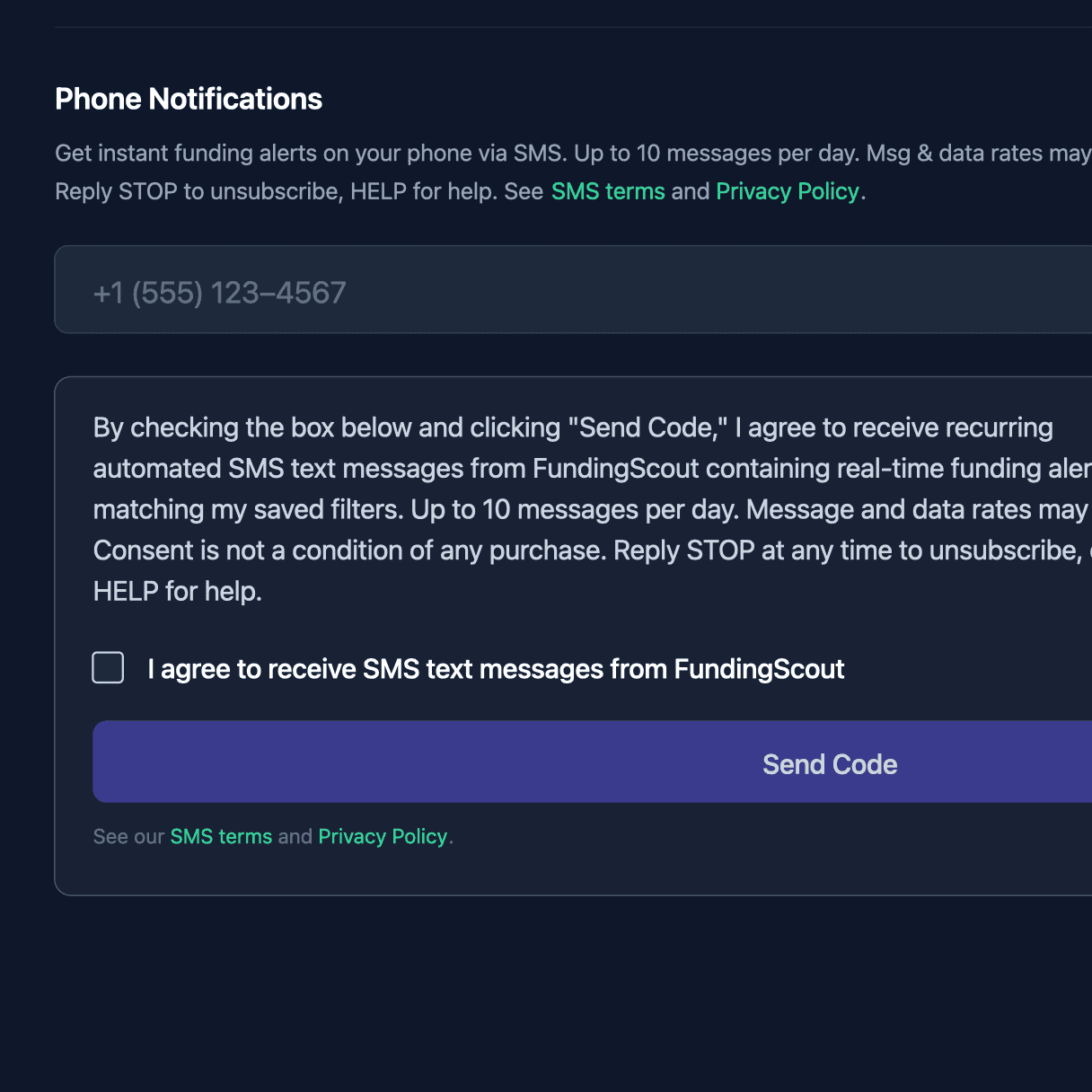
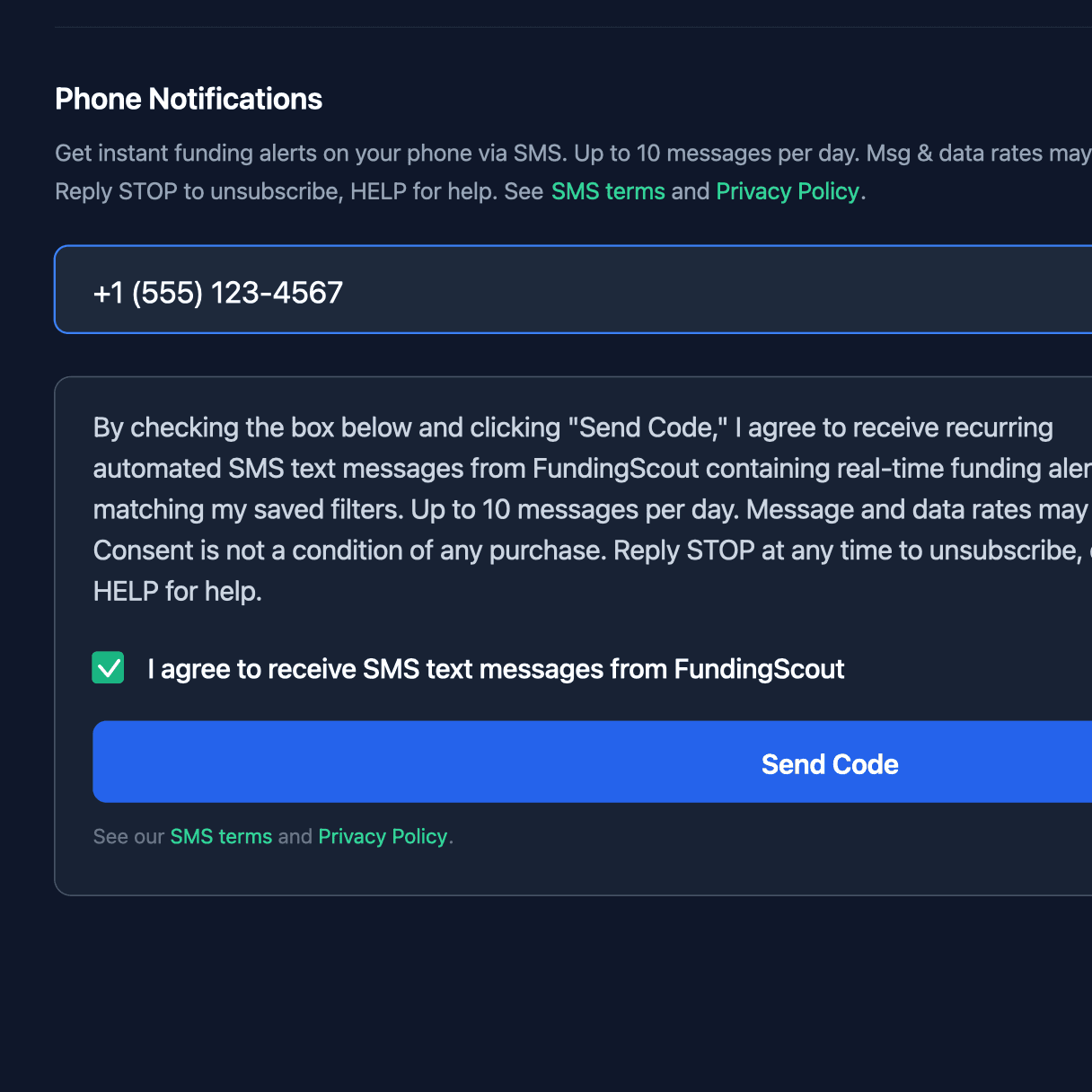
Verbatim consent paragraph shown above the checkbox
By checking the box below and clicking "Send Code," I agree to receive recurring automated SMS text messages from FundingScout containing real-time funding alerts matching my saved filters. Up to 10 messages per day. Message and data rates may apply. Consent is not a condition of any purchase. Reply STOP at any time to unsubscribe, or HELP for help.
Verbatim checkbox label
I agree to receive SMS text messages from FundingScout
How to opt in
Opt-in is a double-confirmation flow that requires both your active sign-up and SMS-based verification of your phone number. You will not receive any SMS until you complete both steps.
- 1
Create a FundingScout account
Start your 7-day trial for $2.99 at fundingscout.io/signup using your email address.
- 2
Enter your phone number and consent to SMS
Once signed in, navigate to Settings → Phone Notifications and enter your mobile number. Before you can proceed, you must read the consent disclosure and check the box confirming:
By checking the box below and clicking "Send Code," I agree to receive recurring automated SMS text messages from FundingScout containing real-time funding alerts matching my saved filters. Up to 10 messages per day. Message and data rates may apply. Consent is not a condition of any purchase. Reply STOP at any time to unsubscribe, or HELP for help.
The "Send Code" button remains disabled until you check the consent checkbox. You must explicitly type your number — we never auto-fill or pull it from any other source.
- 3
Confirm via SMS verification code
Click Send Code. We send a one-time 6-digit verification code to the number you entered via Twilio Verify. Enter that code on the same Settings page to confirm ownership of the phone. Your number is not marked as opted-in until this verification succeeds.
- 4
Receive funding alerts
After verification, you will begin receiving SMS notifications about new startup funding rounds matching your saved alert filters. Each message is short, plain-text, and includes a link to the source article.
Sample messages
Two message types are sent to subscribers. The first is the welcome confirmation immediately after a user completes double opt-in; the second is the recurring transactional alert that fires when a funding event matches the user's saved filters.
1. Welcome confirmation (sent immediately after verification)
FundingScout: You're subscribed to SMS funding alerts. Up to 10 msgs/day. Msg & data rates may apply. Reply STOP to cancel, HELP for help.
2. Recurring funding alert (sent when a saved filter matches)
FundingScout: HexemBio raised $10.4M (seed). https://www.finsmes.com/2026/04/hexembio-raises-10-4m-in-seed-funding/
Sent from FundingScout's verified toll-free number — sender ID may vary by carrier.
Disclosures & consent
What you are agreeing to
By completing the phone verification flow described above, you expressly consent to receive recurring automated SMS notifications from FundingScout about startup funding rounds that match the alert filters you save in your account. Consent is not a condition of any purchase. You may set, change, or remove your alert filters at any time from your Settings page.
Message frequency
Up to 10 messages per day, depending on the breadth of your saved alert filters and how many funding rounds match each day. Most users receive fewer than 5 messages per day.
Carrier rates
Message and data rates may apply. FundingScout does not charge you a per-message fee, but your mobile carrier may. Check with your carrier for pricing on SMS and data services if you are unsure.
How to stop messages
Reply STOP to any FundingScout message at any time to immediately and permanently unsubscribe from SMS notifications. You will receive a single confirmation message and then no further messages. You can also disable SMS notifications by signing into your account, navigating to Settings → Phone Notifications, and removing your verified phone number.
How to get help
Reply HELP to any FundingScout message to receive support contact information. Or email us directly at info@fundingscout.io.
Privacy
Your phone number is stored only to deliver alerts you have requested and is never sold, rented, shared with advertisers, or used for any purpose other than the SMS notification service described on this page. See our Privacy Policy for full details on how we handle phone numbers and SMS data.
SMS Program Terms and Conditions
Last updated: April 2026
1. Program description. The FundingScout SMS alert program (“Program”) delivers automated text message notifications about startup funding rounds that match the alert filters you save in your FundingScout account. The Program is operated by FundingScout (“we,” “us,” “our”).
2. Eligibility. You must be at least 18 years old and the account holder or authorized user of the mobile phone number you enroll. You must have a valid FundingScout account and have completed the double opt-in verification described above.
3. Consent. By checking the consent box on your Settings page and completing SMS verification, you expressly consent to receive recurring automated text messages from FundingScout at the mobile number you provided. Consent is not a condition of purchase of any FundingScout product or service.
4. Message frequency. You will receive up to 10 messages per day. Actual frequency depends on the breadth of your saved filters and how many funding rounds match on a given day. Most users receive fewer than 5 messages per day.
5. Costs. FundingScout does not charge a per-message fee for SMS alerts. Message and data rates from your mobile carrier may apply. Contact your carrier for pricing on SMS and data services.
6. Supported carriers. The Program is available on all major U.S. wireless carriers, including AT&T, T-Mobile, Verizon Wireless, and their MVNOs. Carriers are not liable for delayed or undelivered messages.
7. How to opt out. You may cancel the Program at any time by replying STOP to any FundingScout message. You will receive a single confirmation message and will not receive any further SMS notifications. You may also remove your phone number from Settings → Phone Notifications.
8. How to get help. Reply HELP to any FundingScout message, or email info@fundingscout.io.
9. No warranty. FundingScout alerts are provided on an “as-is” basis for informational purposes only. We do not guarantee the accuracy, timeliness, or delivery of any message, and we are not responsible for investment, business, or other decisions made based on the content of any alert. Nothing in an SMS alert constitutes investment advice or a recommendation to buy or sell any security.
10. Changes. We may modify or terminate the Program at any time, with or without notice. Continued use of the Program after changes constitutes acceptance of the updated terms.
11. Privacy. Information collected in connection with the Program is handled according to our Privacy Policy.
12. Contact. Questions about these Terms? Email info@fundingscout.io.
Ready to start receiving funding alerts?
Start your 7-day trial for $2.99, save your filters, and verify your phone in Settings.
Try 7 days for $2.99